Getting interviewed by AI to write your technical content or blog posts
A couple of weeks ago, I saw something in a Google GDE call that completely changed how I think about writing technical content. Daniela Petruzalek demoed her Speedgrapher MCP for Gemini CLI, and I’ll admit, I was immediately hooked. Not because it automated writing (it doesn’t, not really), but because it introduced a conversational layer between “I have an idea” and “here’s a 2,000-word article.”
The concept is simple: instead of staring at a blank screen trying to organize your thoughts, you let an AI agent interview you about your topic. The AI asks questions, you answer them naturally, and by the end you have a structured transcript that captures not just the facts, but the narrative arc, the pain points, and the technical details that make a blog post actually useful.
I’ve now written three blog posts using this approach. This article you’re reading right now? It started as an AI interview too. Here’s why this workflow clicked for me, and how I adapted it to work with GitHub Copilot CLI, VS Code, and Claude, not just Gemini CLI.
The problem with traditional blog writing
Normally when I write a technical article, I start with a vague sense of what might be interesting and start typing. Sometimes that works great. Other times I realize halfway through that I’ve organized the whole thing wrong, or I’ve skipped critical context that seemed obvious in my head but won’t be obvious to readers.
Don’t get me wrong, I’ve written hundreds of blog posts this way and it’s served me well. But there’s always been this gap between what I know and what ends up on the page. The writing process filters out a lot: the tangential insights, the “oh by the way” details, the thought process behind technical decisions. Those pieces often get lost because I’m focused on the structure and flow of the final article.
What makes the interview approach different
Here’s what I noticed when I first tried Daniela’s Speedgrapher: the AI interviewer doesn’t let you skip ahead. It asks open-ended questions that make you think outside your usual mental framework. When you explain something out loud (or in text) conversationally, you naturally include context you’d otherwise assume was obvious. You mention the rabbit holes you went down. You explain why you chose one approach over another.
The interview format creates a structure without forcing rigidity. The AI uses what’s called an “Open-Focused-Closed” questioning model:
- Open questions explore the topic broadly: “What problem were you trying to solve?”
- Focused questions drill into specifics: “Can you share the exact error message?” or “What did that code snippet look like?”
- Closed questions confirm understanding: “So the fix was upgrading to version 2.1?”
This progression naturally builds a narrative arc. You’re not just dumping information—you’re telling a story with clear cause and effect.
My First Experiment: Testing Speedgrapher
After seeing Daniela’s demo, I did what any developer would do: I immediately went to the Speedgrapher repo, cloned it, built the MCP (Model Context Protocol server), and configured it for Gemini CLI.
For context: Gemini CLI supports custom slash commands, which are essentially shortcuts that trigger specific AI behaviors. Speedgrapher uses this to implement its interviewer as a slash command. When you invoke it, the AI switches into interview mode and starts asking questions.
The first test went really well. So well that I wrote three blog posts with it over the next week. The workflow felt natural: I’d have a rough idea for an article, start the interview, spend 10 minutes answering questions, and end up with a detailed transcript that captured way more nuance than my initial mental outline.
The Limitation: Platform Lock-In
Here’s the catch: Speedgrapher was built specifically for Gemini CLI’s slash command system. That’s great if you’re using Gemini CLI, but I also use GitHub Copilot CLI, VS Code with Copilot Chat, and Claude regularly. Each tool has its own way of handling AI assistants, and none of them (at the time) supported Gemini’s slash command format.
I could have just stuck with Gemini CLI for article writing. But I realized the core concept, an AI agent with a specific interviewer prompt, didn’t have to be tied to one platform. The “interview” behavior is just a carefully crafted prompt that guides the AI’s questioning style and output format. If I could package that prompt in a way each platform understood, I could use the same workflow everywhere.
Building cross-platform Ghostwriter Agents
This is where I got a bit ambitious: I decided to create agent files that would work across GitHub Copilot CLI, VS Code, and Claude from day one. No point building for one platform and porting later, I use all three tools regularly depending on context.
Here’s the elegant part: agents are nothing more than Markdown files with prompts inside them. Each tool reads these files from specific locations:
- GitHub Copilot CLI:
~/.copilot/agents/(global) - VS Code:
.github/agents/in your project - Claude:
~/.claude/agents/(global)
The structure is simple. Here’s a simplified version of what an agent file looks like:
---name: "ghostwriter-interviewer"description: "Interviews an author to produce a technical blog post"---
Act as an expert interviewer for a technical blog...[Full prompt with instructions, guidelines, and behavioral rules]That’s it. The YAML frontmatter gives the agent a name and description, and the markdown body contains the prompt that defines how the AI should behave.
The agents
Speedgrapher consists of various slash commands, but I distilled the core functionality into five agents:
- The interviewer: conducts the interview and gathers raw material
- The voice agent: analyzes your writing style to create a voice profile
- The writer agent: expands the interview transcript into a full article
- The context agent: when you need to restart, or want to continue with an existing draft interview, you can load the context with this agent
- The reviewer agent: reviews and refines the draft for clarity and flow
Here’s a breakdown of the main three agents you’ll use most often:
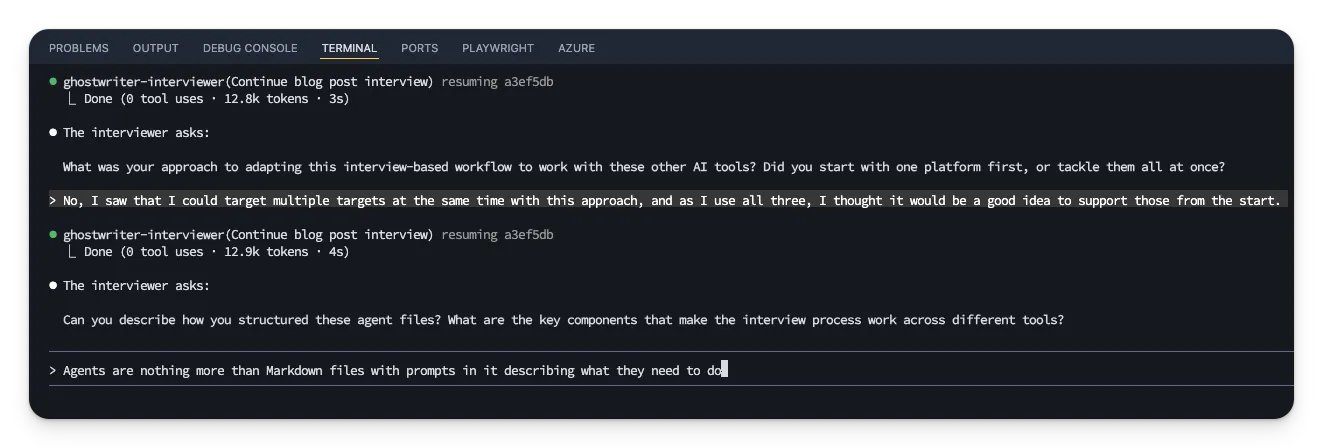
1. The interviewer agent
Its job is to ask questions and gather raw material. The prompt instructs it to:
- Ask exactly one question per turn (no overwhelming multi-part questions)
- Use the Open-Focused-Closed model to progressively narrow in on details
- Request actual artifacts: real code snippets, exact error messages, specific version numbers
- Focus on narrative elements: pain points, breakthroughs, “aha moments”
- Maintain a cozy but professional tone (think knowledgeable peer, not distant expert)
When you’re done, you tell the agent to stop, and it outputs a complete markdown transcript saved as INTERVIEW.md.
2. The voice agent (optional but recommended)
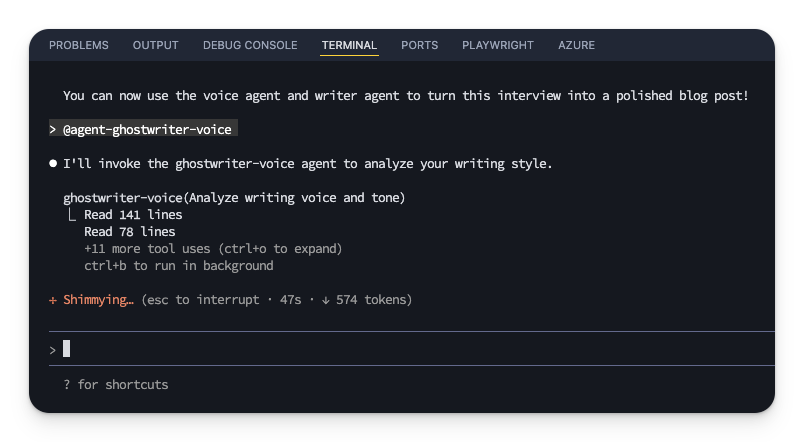
The voice agent scans your existing content like blog posts, documentation, whatever you’ve written before and analyzes your writing style. It produces a detailed profile that includes:
- Voice characteristics: tone, pacing, formality level, typical sentence structure
- Style rules: what you do and don’t do in your writing
- Lexicon: your favorite phrases, transitions, and words you avoid
- Structure patterns: how you typically start and end articles, your heading style
This profile gets saved and used by the writer agent in the next step. The result? AI-generated drafts that actually sound like they came from you, not from Generic Tech Blog #47.
Running the voice agent is optional, you can skip straight to the writer, but I highly recommend doing it at least once. The quality difference is noticeable.
3. The writer agent
This agent takes the interview transcript and (if available) your voice profile, then expands it into a full article. But it’s not just a transcript formatter. The prompt instructs it to:
- Add context and definitions for complex terms
- Identify every tool, library, or technology mentioned and add proper markdown links
- Explain the why behind code examples, not just the syntax
- Maintain narrative flow and the article’s emotional arc
- Follow “cozy web” editorial guidelines (helpful, relatable, narrative-focused)
The output is a markdown document ready for review. In my experience, the drafts are already well-structured—I mostly add screenshots, refine code examples, and adjust a few phrasing choices.
Using the Agents in practice
Each platform has a slightly different invocation method, but they all use the same underlying markdown files:
In Claude:
Type @agent-ghostwriter-interviewer to start the interview. The @ symbol lets you reference agents by name.
In GitHub Copilot CLI:
Launch the CLI, select /agent, then choose the ghostwriter-interviewer from the list.
In VS Code with Copilot Chat: Open the agent selector dropdown and pick the interviewer agent.
Once invoked, the experience is remarkably consistent across all three platforms. You answer questions, the AI follows up naturally, and you end with a complete transcript.
What I’ve learned after three articles
The biggest surprise isn’t the time savings, although it does feel faster, but the quality of the raw material. When an AI interviews you, it asks about things you might not have thought to include. It pushes you to articulate the “why” behind decisions. It captures those tangential insights that usually get edited out.
Something I’m still working on: making it easier to include screenshots and code samples during the interview process. Right now I add those in the review phase, after the writer agent has produced the draft. It works, but it feels like there’s room for improvement there.
The other thing I’ve noticed is that the articles feel more complete from the start. There’s less “oh, I forgot to explain this fundamental concept” during editing because the interviewer forced me to explain it during the conversation.
Try it yourself
All credit for this idea goes to Daniela Petruzalek and her Speedgrapher MCP. I just adapted the concept to work across multiple platforms.
I’ve made the ghostwriter agents available at github.com/estruyf/ghostwriter-agents-ai. Installation is straightforward, you can install for all supported platforms at once:
npx @estruyf/ghostwriterOr target specific platforms:
# Install for specific platformsnpx @estruyf/ghostwriter --vscodenpx @estruyf/ghostwriter --copilotnpx @estruyf/ghostwriter --claudeThe installer copies the agent files to the right locations for each tool.
What’s next
Right now I’m waiting to see how others use this workflow. Different writing styles, different content types, I’m curious whether the three-agent pipeline holds up across different use cases.
The screenshot integration is still on my mind. There’s probably a way to handle visual artifacts more elegantly during the interview phase.
If you write technical articles or blog posts, I’d encourage you to give this a try. It’s a genuinely different experience from traditional writing, not better or worse, just different. You might find, like I did, that having an AI ask you questions unlocks parts of your knowledge that wouldn’t have made it into the article otherwise.
Let me know what you think. And if you try the ghostwriter agents, I’d love to hear how it works for your writing process.
Resources
- Daniela Petruzalek on Bluesky - Original creator of Speedgrapher
- Speedgrapher MCP - Original interview-based writing tool for Gemini CLI
- Gemini CLI - Google’s command-line interface for Gemini
- Gemini CLI Custom Slash Commands - Documentation on Gemini’s slash command system
- Ghostwriter Agents AI - Cross-platform agent files for GitHub Copilot, VS Code, and Claude
- @estruyf/ghostwriter on npm - Installation package for ghostwriter agents
Related articles
From idea to production in under an hour with AI
How I used GitHub Copilot and AI-powered development tools to build a complete VS Code extension stats dashboard from scratch in record time.
Ghostwriter for VS Code: your AI interviewer in your editor
I am releasing a new VS Code extension that brings the Ghostwriter interview experience directly into your editor, helping you write authentic content faster.
The Future of Documentation: Ready for Change?
Discover the latest advancements in documentation technology and how tools like GitHub Copilot for Docs, Mendable, and OpenAI are changing the game.
Report issues or make changes on GitHub
Found a typo or issue in this article? Visit the GitHub repository to make changes or submit a bug report.
Comments



Let's build together
Manage content in VS Code
Present from VS Code
Engage with your audience throughout the event lifecycle