Exploring the GitHub Copilot SDK: Building a Ghostwriter App
As a developer, I am always curious about how to optimize my workflow, especially when it comes to writing technical content. That was part of the reason I started to create the Ghostwriter Agents for AI. One of the things I tried to take it a step further was to build a “Ghostwriter” application, but I never got around to finishing it. The reason was the AI layer. Should I build my own? Use an existing API?
With the release of the GitHub Copilot SDK I decided to revisit that idea. This artilce is the story of how I used the SDK to finally build my Ghostwriter app, and the lessons I learned along the way.
The challenge: seamless AI integration
My goal was simple. I wanted an application that could act as an interviewer, asking me questions about a topic, and then use my answers to draft a post.
I already had the prompts ready in my Ghostwriter Agents AI project:
- Interviewer: A persona that digs into the topic.
- Writer: A persona that takes the interview context and generates the article.
The missing piece was the “glue.” In my previous attempt, managing the AI context and API calls was a headache. I wanted something seamless, where I could just use what is already available in the ecosystem without reinventing the wheel.
Starting with Astro
I must admit, when I first looked at the Copilot SDK, documentation was a bit scarce. There were some videos, but not many concrete samples. But hey, that’s part of the fun of the job, right? The best way I learn is by starting a new project.
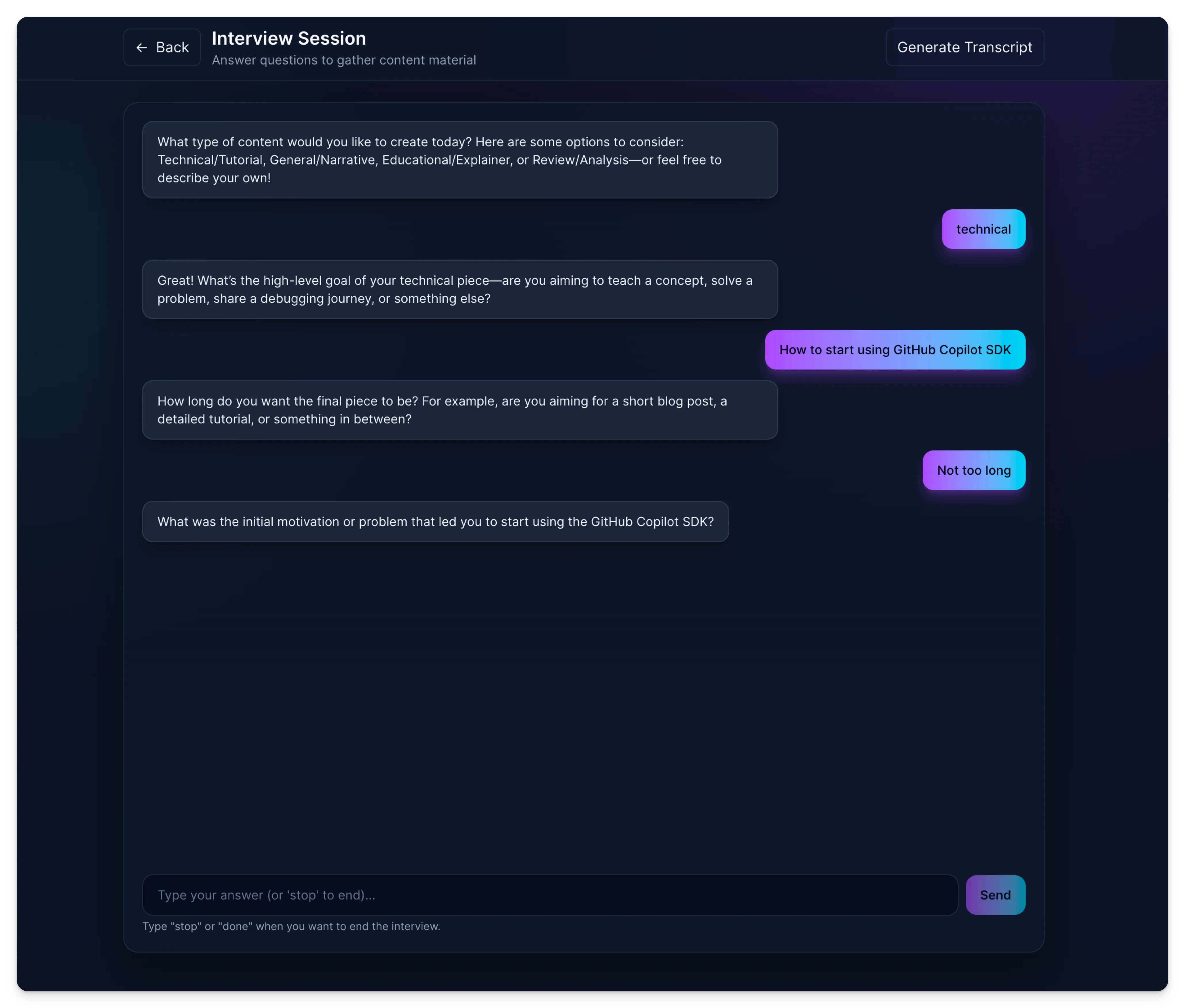
I spun up a new Astro project. My plan was to create a simple website with an API that communicated with the Copilot CLI.
Here is the cool part: I actually used GitHub Copilot to write the integration code for me. I pointed it to the GitHub Copilot SDK - Getting started page in the documentation, and it scaffolded the connection almost perfectly. All I had to do was review it to understand how the data flowed.
The pivot to Electron
The Astro prototype worked great for the interview logic, but I hit a snag when I thought about distribution.
The Copilot SDK relies on communicating with the Copilot CLI. If I hosted this as a web app, the backend wouldn’t have that local CLI connection. I needed this to run locally on the user’s machine.
I initially thought, “Perfect, I’ll build a Tauri app!” I love working with Tauri, and it seemed like a natural fit. Unfortunately, the SDK doesn’t support Rust just yet. So, I decided to move the project to Electron.
Solving the packaging puzzle
Moving to Electron solved the runtime issue, but it introduced a new one: packaging. When I tried to bundle the application, the communication with the Copilot CLI kept failing. It was one of those “it works on my machine” moments that drives you crazy.
That is when I discovered a feature that saved the project: the Copilot CLI Server.
Instead of relying on the default environment integration, you can manually start the Copilot CLI in server mode on a specific port.
copilot --server --port 4321Once that server is running, you can tell the SDK exactly where to look. Here is how I configured the client in my Electron app:
import { CopilotClient } from "@github/copilot-sdk";
// Connect to the local CLI serverconst client = new CopilotClient({ cliUrl: "localhost:4321"});
// Use the client normally to start the interview sessionconst session = await client.createSession();By spawning the CLI server when the Electron app starts, I established a reliable bridge between my UI and the AI.
The result
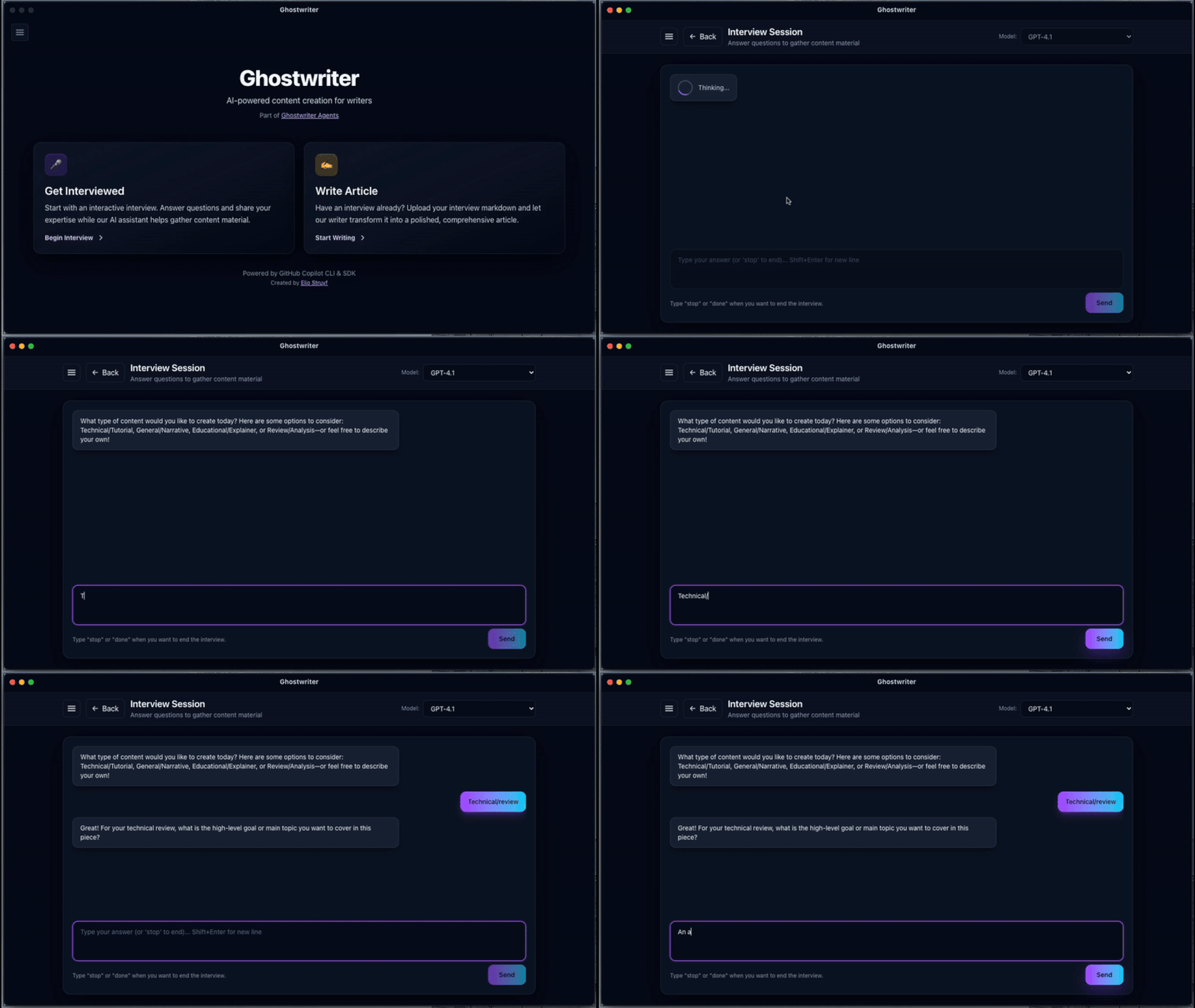
With the connection fixed, the app now works exactly as I imagined. It runs the “Interviewer” agent to gather my thoughts, passes that context to the “Writer” agent, and generates a draft. All powered by the Copilot account I’m already signed into.
Don’t get me wrong, it’s still an early version, but the friction of “building the AI” is completely gone. I can focus entirely on refining the prompts and the user experience.
Conclusion
The GitHub Copilot SDK is a game-changer for developers looking to integrate AI into their applications without the overhead of managing authentication, AI, and API complexity. My journey from a stalled project to a working Ghostwriter app in Electron is proof of that.
What impressed me the most was how smoothly things came together once I understood the core concepts. The SDK abstracts away the messy parts like token management, session handling, streaming responses. It leaves you free to focus on your prompts and user experience.
If you’re sitting on an idea that needs AI capabilities, the Copilot SDK removes one of the biggest barriers to entry. No need to negotiate with multiple API providers or implement your own LLM infrastructure. Just point to your local CLI, define your prompts, and build.
The journey wasn’t completely frictionless. The initial documentation gap and the Electron packaging hurdle taught me a thing or two, but those are the kinds of challenges that are good to think out of the box, use your creativity, or GitHub Copilot to get it solved.
Let me know what you think if you give the SDK a try.
Resources
Related articles
The Future of Documentation: Ready for Change?
Discover the latest advancements in documentation technology and how tools like GitHub Copilot for Docs, Mendable, and OpenAI are changing the game.
Metered Billing for GitHub Copilot: A Necessary Shift
Explore the implications of GitHub Copilot's metered billing and how it reshapes developer workflows and AI tool usage.
From idea to production in under an hour with AI
How I used GitHub Copilot and AI-powered development tools to build a complete VS Code extension stats dashboard from scratch in record time.
Report issues or make changes on GitHub
Found a typo or issue in this article? Visit the GitHub repository to make changes or submit a bug report.
Comments



Let's build together
Manage content in VS Code
Present from VS Code
Engage with your audience throughout the event lifecycle