Caching Dev Proxy in your GitHub Actions workflows
This post is over a year old, some of this information may be out of date.
In the previous posts, I explained using the Microsoft’s Dev Proxy in a GitHub Actions workflow on a macOS and Ubuntu virtual machine. One thing I noticed is that the Dev Proxy installation fails in some runs.
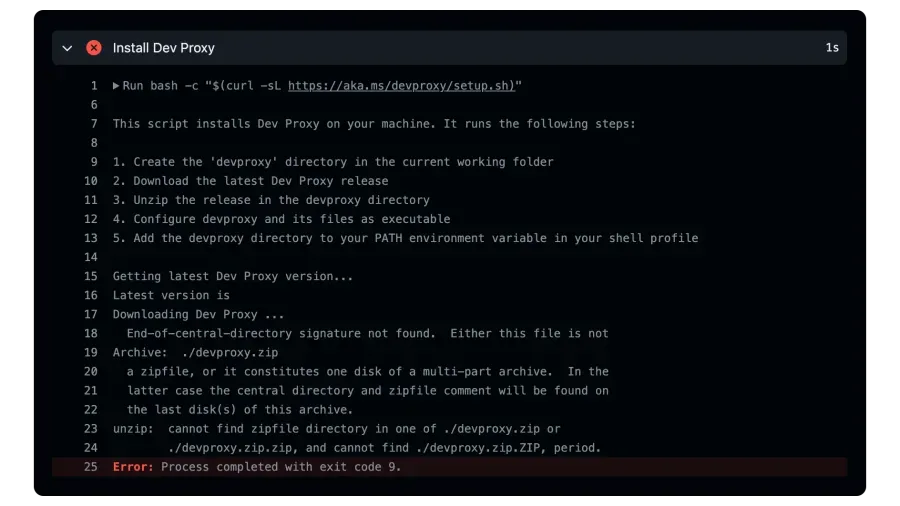
A way to solve this issue is by caching the Dev Proxy, and another benefit is that it speeds up your workflow.
This blog post shows how to cache the Dev Proxy in your GitHub Actions workflows. By caching it, it uses the cached version if it is available, and if not, it will download and install it.
Retrieving the latest Dev Proxy version number
We must first fetch the latest version number to cache the Dev Proxy. That way, we only retrieve the latest version if it is not cached. For this, we can use the GitHub release API:
- name: Store Dev Proxy's Version run: | DEVPROXY_VERSION=$(curl -s https://api.github.com/repos/microsoft/dev-proxy/releases/latest | jq .tag_name -r) echo "Dev Proxy's Version: $DEVPROXY_VERSION" echo "DEVPROXY_VERSION=$DEVPROXY_VERSION" >> $GITHUB_ENVIn the above step, we use curl to fetch the latest release information from the Dev Proxy repository. We use jq to extract the tag_name from the JSON response. The version number gets stored in the DEVPROXY_VERSION environment variable.
Caching the Dev Proxy
Next, we use the actions/cache action to cache the Dev Proxy. We can use the following step to cache the Dev Proxy:
- name: Cache Dev Proxy id: cache-devproxy uses: actions/cache@v4 with: path: ./devproxy key: devproxy-${{ env.DEVPROXY_VERSION }}In the above step, we use the actions/cache action to cache the devproxy folder. We use the DEVPROXY_VERSION environment variable as the key for the cache so that when a new version is released, the latest version will be installed and cached.
The cache action outputs a cache-hit boolean to indicate whether the Dev Proxy version was cached. The next steps will use that output to determine whether the Dev Proxy needs to be installed.
Installing the Dev Proxy
After the cache action, we can use the following step to install the Dev Proxy only when needed:
- name: Install Dev Proxy if: steps.cache-devproxy.outputs.cache-hit != 'true' run: bash -c "$(curl -sL https://aka.ms/devproxy/setup.sh)"In the above step, we use the if condition to check if the Dev Proxy version was available from the cache. Notice the cache-devproxy and cache-hit references. The cache-devproxy is the ID of the cache action, and cache-hit is the output of the cache action.
Using this approach, you can cache the Dev Proxy in your GitHub Actions workflows and speed up your workflow.

The complete GitHub Actions workflow
Here is the complete GitHub Actions workflow that caches the Dev Proxy:
name: ubuntu Dev Proxy
on: push: branches: - main - dev workflow_dispatch:
jobs: test: timeout-minutes: 60 runs-on: ubuntu-latest steps: - uses: actions/checkout@v4
- name: Store Dev Proxy's Version run: | DEVPROXY_VERSION=$(curl -s https://api.github.com/repos/microsoft/dev-proxy/releases/latest | jq .tag_name -r) echo "Dev Proxy's Version: $DEVPROXY_VERSION" echo "DEVPROXY_VERSION=$DEVPROXY_VERSION" >> $GITHUB_ENV
- name: Cache Dev Proxy id: cache-devproxy uses: actions/cache@v4 with: path: ./devproxy key: devproxy-${{ env.DEVPROXY_VERSION }}
- name: Install Dev Proxy if: steps.cache-devproxy.outputs.cache-hit != 'true' run: bash -c "$(curl -sL https://aka.ms/devproxy/setup.sh)"
- name: Run Dev Proxy run: ./devproxy/devproxy &
# Include all the other steps to start using the Dev ProxyIn the above workflow, we first store the Dev Proxy’s version number. We then cache the Dev Proxy using the actions/cache action. If the Dev Proxy version was not cached, we install it using the curl command. Finally, we run the Dev Proxy using the ./devproxy/devproxy command.
Related articles
Using Dev Proxy in your GitHub Actions workflow on macOS
Learn how to use Dev Proxy in a GitHub Actions workflow on macOS hosted VM for intercepting and inspecting your API calls
Using Dev Proxy in your GitHub Actions workflow on Ubuntu
Learn how to use Dev Proxy in a GitHub Actions workflow on an Ubuntu hosted VM for intercepting and inspecting your API calls
Manual GitHub workflow triggers for Azure Static Web Site
Report issues or make changes on GitHub
Found a typo or issue in this article? Visit the GitHub repository to make changes or submit a bug report.
Comments



Let's build together
Manage content in VS Code
Present from VS Code
Engage with your audience throughout the event lifecycle